The lines before the copper: how a PCB editor draws the ratsnest
Shortest tree, fewest candidates, only the gaps: the graph behind every airwire.
You import the netlist, and every part lands on the board at once. Thin straight lines run from pad to pad across the whole heap. They look like wires, but they aren't copper. They're the ratsnest: the editor's running answer to one question, which pads still need joining? It answers again every time you route a track or drag a part. Underneath is a graph problem from the 1950s, a triangulation trick from the 1970s, and a few shortcuts that keep the lines moving under your cursor.
Contents
A list of pins isn't a picture
The netlist from your schematic is a set of pins for each net. GND is U1 pin 4, C1 pin 2, J1 pin 1 and so on. It doesn't say which pin connects directly to which, because electrically it doesn't matter: every pin on the net just has to end up in one connected piece of copper.
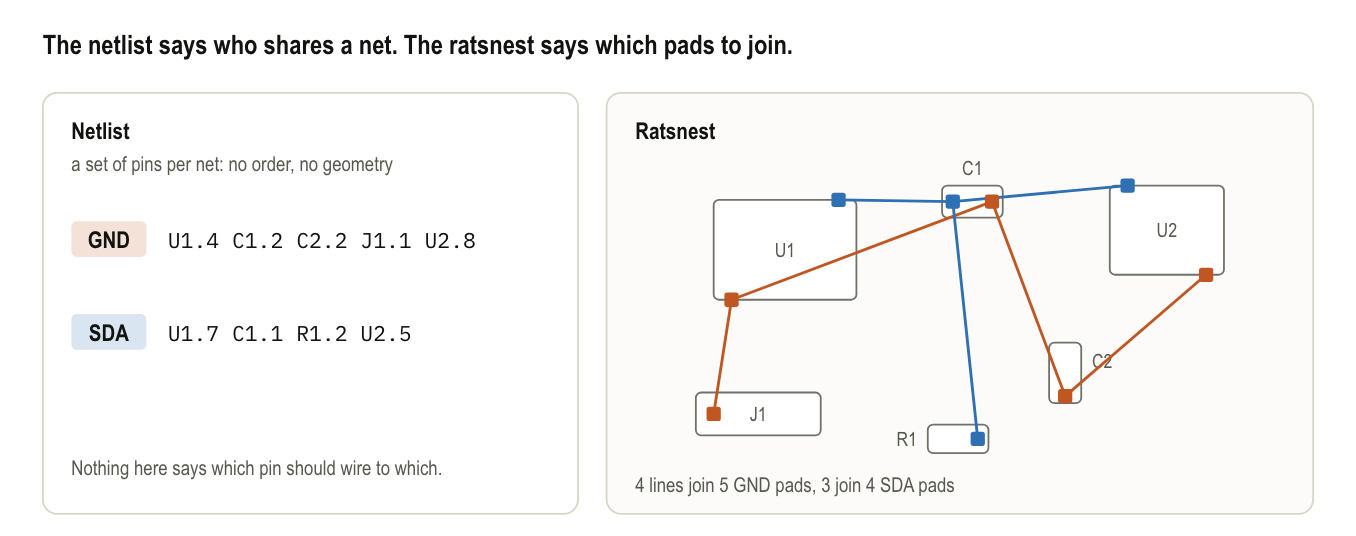
The editor has to turn that set into something you can see and route. Drawing a line between every pair would be correct but useless. A net with n pads has n(n − 1)/2 pairs. A modest GND net with 40 pads would get 780 lines, and the board would turn solid.
So how few lines will do? Any set of lines that connects every pad and has no loops is a tree, and a tree on n pads always has exactly
lines needed = n − 1
One fewer and some pad is cut off. One more and there's a loop, which means a line you didn't need.
The shortest tree
There are a huge number of trees to choose from. Nine pads have 4,782,969 of them, by Cayley's formula. The ratsnest picks the one with the smallest total length: the minimum spanning tree.
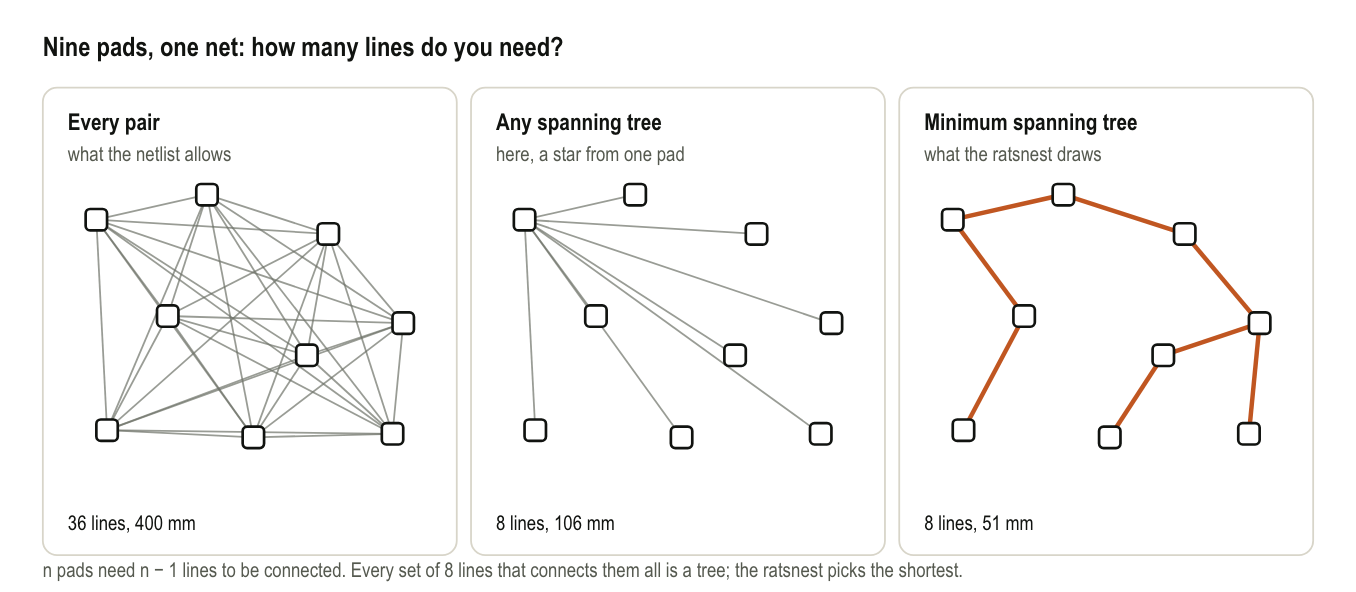
It's the right choice for two reasons. Lines in a minimum spanning tree never cross each other, so the picture stays readable. And each line suggests a track you could actually route: the closest pair of things that still need joining. When you move a part and the ratsnest gets shorter and tidier, the placement is usually getting better.
Kruskal: shortest first, never a loop
Joseph Kruskal published the classic method in 1956, and it fits in a sentence. Sort every candidate pair by length. Go down the list, and keep each pair unless both ends are already connected, because then it would close a loop. Stop when you have n − 1 lines.
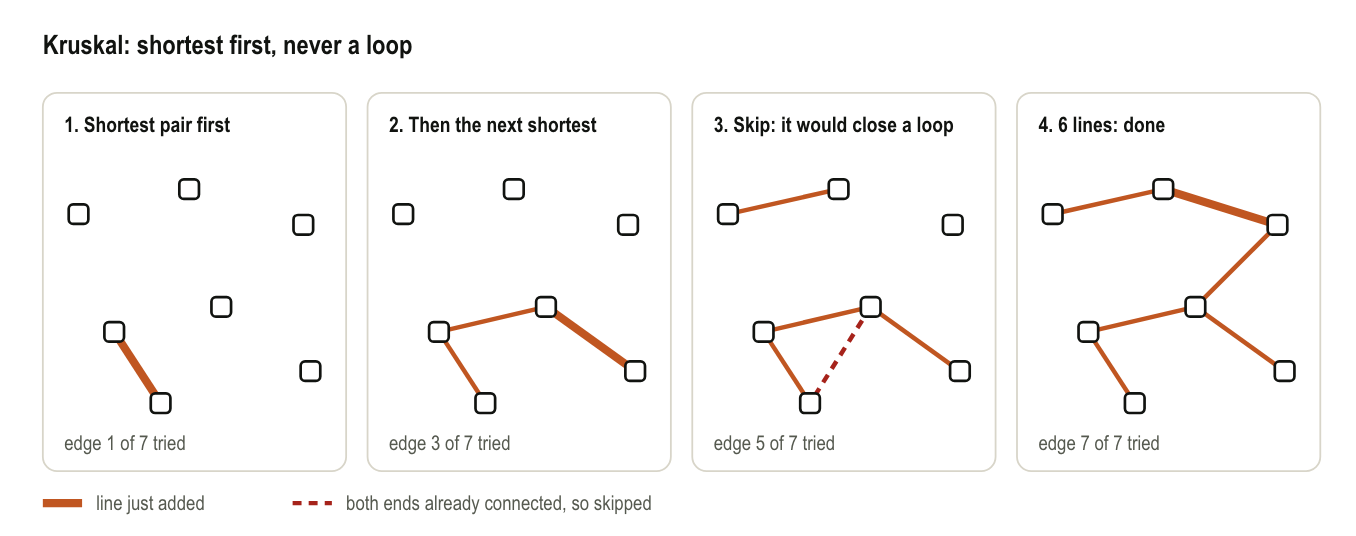
The only tricky step is "already connected". A union-find structure answers it in nearly constant time: every pad belongs to a group, accepting a line merges two groups, and two pads are connected when they're in the same group. Robert Prim's 1957 method grows one tree outward from a single pad instead, and it reaches the same total length.
KiCad uses Kruskal with union-find. Its development version has switched to Filter-Kruskal, a 2009 refinement that avoids fully sorting long lists of edges. That version also breaks ties between equal lengths by coordinates, so the result doesn't depend on the order the sort happened to see them.
Checking every pair is too slow
Kruskal is only as fast as the list you give it. Feed it every pair, and a 500-pad ground net hands it 124,750 candidates, every time anything on that net changes.
Most of those pairs can never win. A line from one corner of the board to the other is never part of the shortest tree when there are pads in between. The question is which pairs you can throw away without looking.
The answer is the Delaunay triangulation. Join the pads into triangles so that no pad sits inside any triangle's circumcircle. Shamos and Hoey showed in 1975 that every edge of the minimum spanning tree is one of the triangulation's edges. So run Kruskal on those edges only.
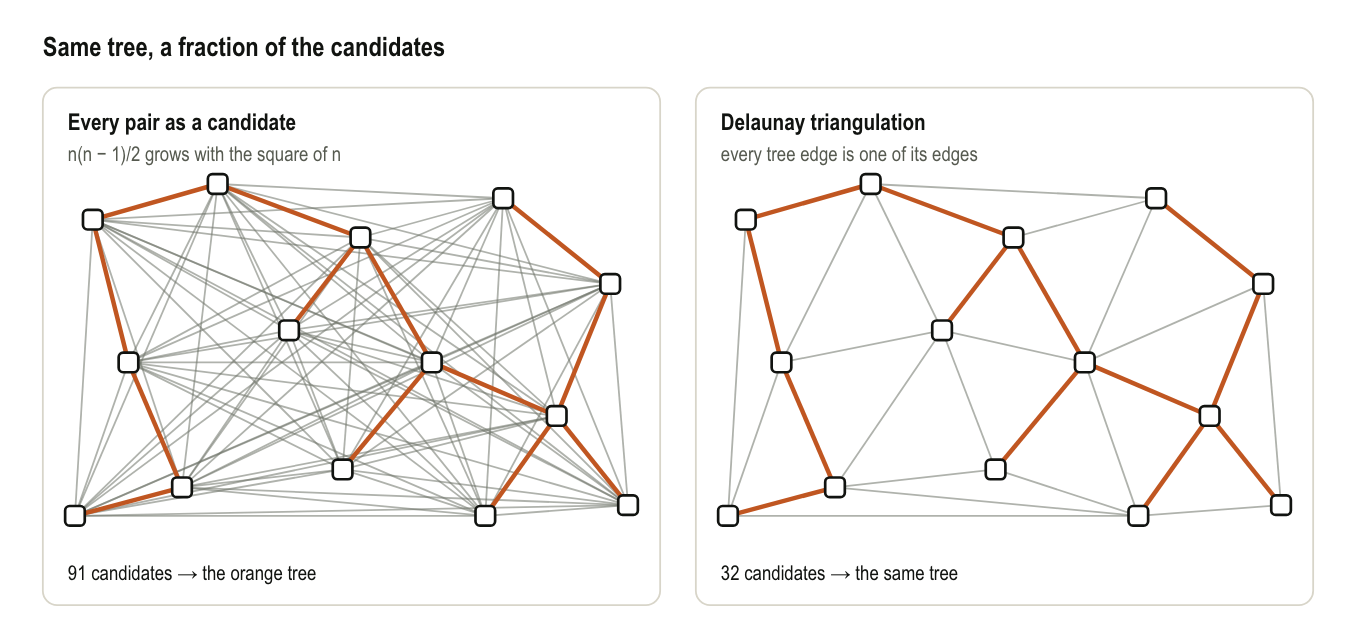
A triangulation of n points (three or more) has at most 3n − 6 edges. For the 500-pad net that's 1,494 candidates instead of 124,750, and the triangulation itself takes O(n log n) time.
KiCad's ratsnest code does exactly this. It triangulates each net's points with the Delaunator library, a comment notes the 3n − 6 bound, and Kruskal runs on the edges that come out. It also handles the cases a triangulator dislikes:
- Two points. A net with two or fewer pads skips the triangulation.
- Points in a line. Collinear pads have no triangles, so they're chained in order along the line.
- Points on top of each other. Duplicates are merged before triangulating, then linked back up.
Lengths are straight-line distances, not horizontal plus vertical.
Copper you've already laid
So far each pad has been its own dot. On a real board, half the net is already routed, and the ratsnest has to show only what's left.
KiCad first groups the net's copper into clusters. Pads, tracks, vias and zone fills that touch each other on the same net form one cluster. Each item adds anchor points to the graph: a pad or via adds its centre, and a track adds both ends. Anchors in the same cluster are tied together with edges of length zero.
Kruskal takes zero-length edges first, so each cluster joins up before any real line is considered. Those edges are never drawn, because copper already makes them. What's left is one airwire for each gap between clusters, from whichever anchors are closest.
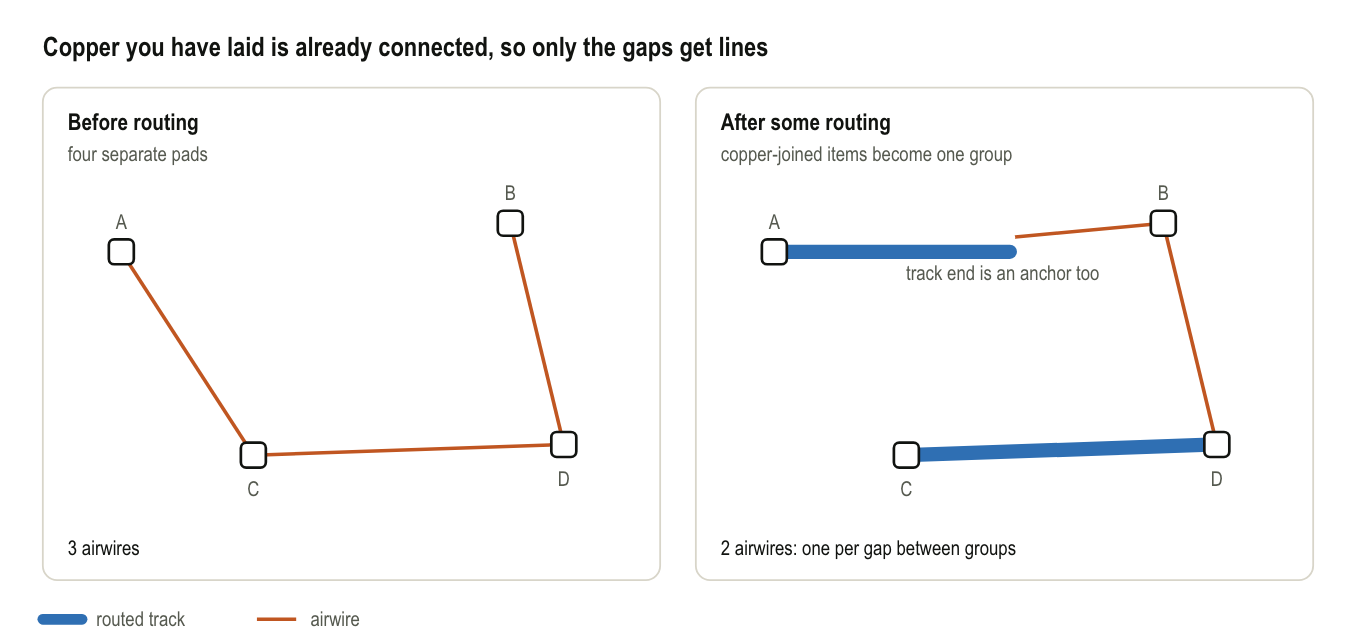
That's why an airwire jumps to the end of a half-routed track as soon as you stop drawing: the track's end became an anchor.
Zones get special handling. Each separate filled area of a zone adds a single anchor, its first outline point. A clean-up pass then moves airwire ends that touch a zone to the nearest corner of the filled copper, so the line doesn't aim at an arbitrary one.
The work is kept small, too. Only nets marked as changed are recomputed, and they're spread across KiCad's thread pool.
While you drag
Moving a part is the hardest case. The cursor fires dozens of events a second, and every net on the part changes on each one.
KiCad doesn't rebuild the full tree while you drag. It takes a snapshot of the moving items and hides their lines in the main ratsnest. Then, on each mouse move, it draws one line per net: between the nearest pair of anchors where one is moving and the other isn't. A sweep across sorted positions finds that pair, and the nets are spread across threads.
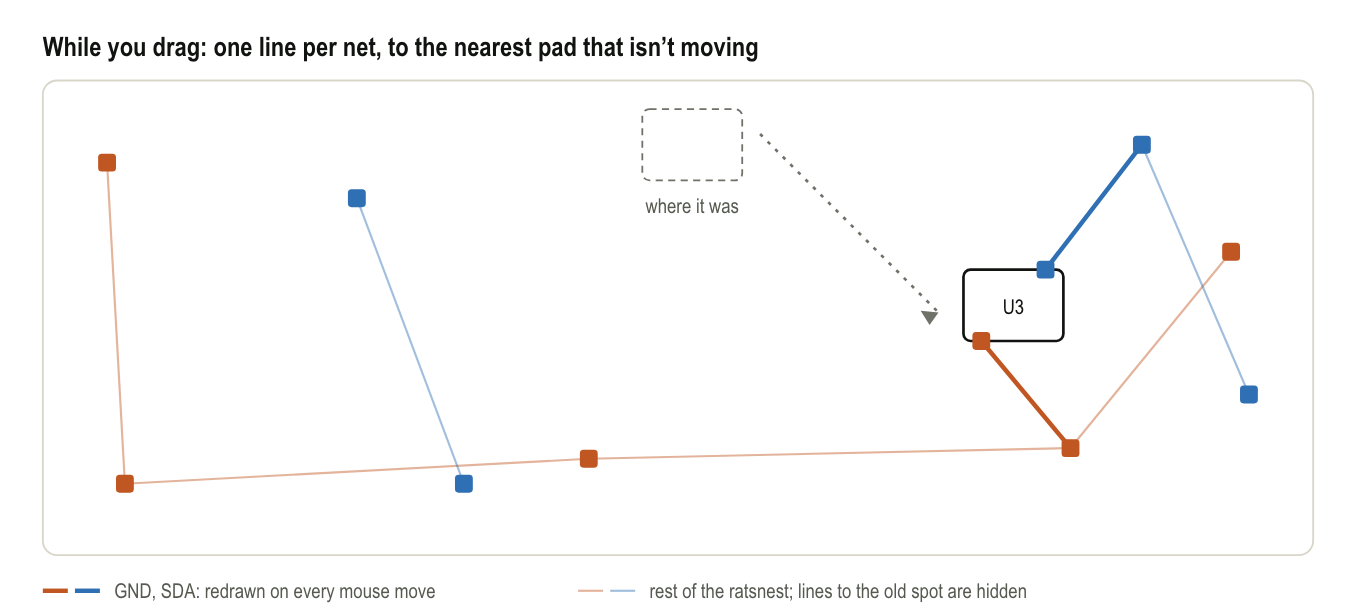
It's a cheaper question than the full tree, and for placement it's the useful one: where's the nearest thing this part has to reach? When you drop the part, the affected nets are recomputed properly.
The ratsnest isn't a drawing of your connections. It's a fresh answer, recomputed every time you touch the board.
Placing parts by the lines
The ratsnest does its best work before there's any copper. Each line is a track you'll have to route, so the picture is a rough cost estimate you can see.
- Hide the big nets first. GND and the supply rails reach almost every part, so their lines swamp everything else. Hide them and the signal nets show you which parts belong together.
- Look for crossings. Two parts joined by a bundle of crossed lines often want rotating or flipping. Untangle the bundle and the routing gets easier before you've drawn a track.
- Look for long lines. A line across the whole board usually means a part sits far from the parts it talks to.
- Watch the lines while you drag. Because the nearest-pad lines update as you move, you can slide a part until its lines are short and parallel, then let go.
None of this is exact. The tree ignores obstacles and layers, and its length isn't the routed length. But a shorter, less tangled ratsnest is a cheap sign the placement is heading the right way.
The shortest tree isn't the shortest copper
A spanning tree can only join pads to pads. Copper can branch anywhere. Add a junction point that isn't a pad, a Steiner point, and the tree can get shorter.
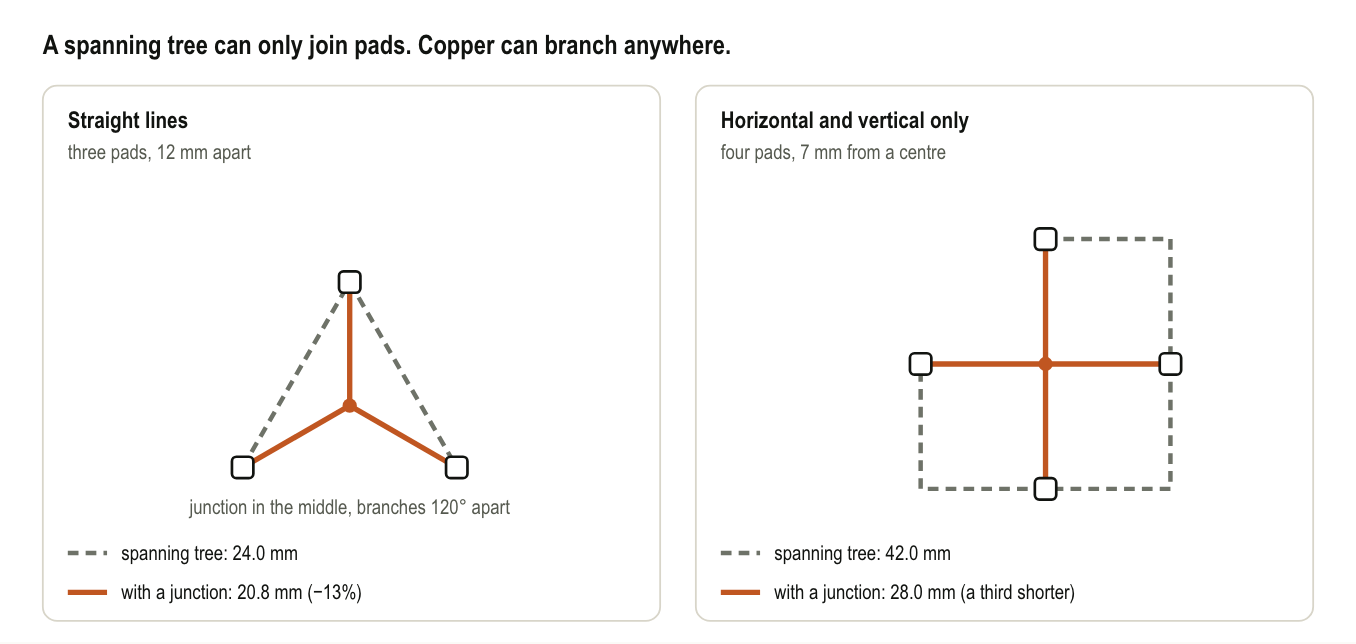
For three pads in an equilateral triangle, the best tree uses two sides. A junction in the middle, with branches 120° apart, is 13% shorter. With horizontal and vertical tracks only, it gets worse: Hwang proved in 1976 that the rectilinear spanning tree is never more than 1.5 times the shortest possible network, and the diamond in the figure hits that limit exactly. For straight lines, Gilbert and Pollak conjectured in 1968 that the worst case is 2/√3, about 1.15. A 1990 proof was later disputed, and the question is widely regarded as unsettled.
Finding the shortest network with junctions is the Steiner tree problem. Garey and Johnson proved the rectilinear version NP-complete in 1977, so no editor solves it live. A ratsnest also ignores:
- Obstacles. A line can run straight through a part or a keep-out.
- Layers. In KiCad's "All layers" mode, lines join unconnected items on every layer, including ones you've hidden.
- The routing angles you'll use. It draws straight lines, but you'll route at 45° and 90°.
Read it as an estimate and a direction hint, not a plan. It isn't even a lower bound: copper with junctions can be shorter than the tree.
When the shortest shape is wrong
Sometimes the shortest tree is the wrong shape for the signal. A bus may need its loads in a chain. A source may need a separate branch to each load. Tree length doesn't capture either.
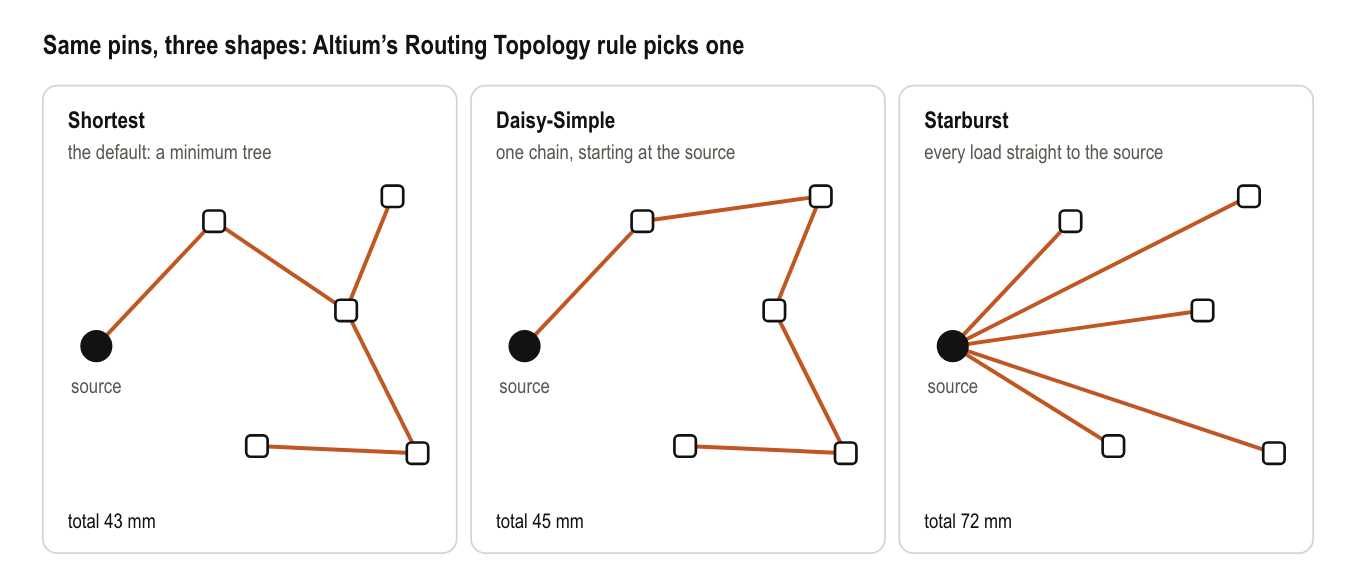
Altium lets a rule set the shape. Its Routing Topology rule offers:
- Shortest: the default, the shortest overall connection.
- Horizontal and Vertical: favour one direction 5:1 over the other.
- Daisy chains: Daisy-Simple, Daisy-MidDriven and Daisy-Balanced, in order from a source to terminators.
- Starburst: every node connected straight to the source.
The autorouter follows the rule, and design rule checks enforce it. KiCad's ratsnest is always the minimum tree. Any topology you need is up to you as you route.
Reading the ratsnest
The lines are a tool, and a few settings make them a better one. In KiCad:
| If you want to… | Use | Note |
|---|---|---|
| Clear the GND and power clutter | Hide the net in the Appearance panel's Nets tab | Display only. Connectivity and DRC are unchanged |
| See one part's connections | Local Ratsnest tool | Each footprint keeps its setting after the tool closes |
| Separate overlapping lines | Curved ratsnest | Bows each line slightly so stacked lines come apart |
| Ignore layers you're not working on | Ratsnest mode: Visible layers | No lines to items on hidden layers |
| Tell nets apart | Net and net class colours | Colour the ratsnest only, or the copper too |
When the lines run out, run DRC anyway. In KiCad, its unconnected items come from the same tree: each remaining airwire becomes one "Missing connection" entry. But DRC counts nets you've hidden from view, and it can refill every zone first, so a stale fill that no longer reaches a pad shows up before you plot.
Sources
- J. B. Kruskal, On the Shortest Spanning Subtree of a Graph and the Traveling Salesman Problem, Proc. AMS, 1956.
- R. C. Prim, Shortest Connection Networks and Some Generalizations, Bell System Technical Journal, 1957.
- M. I. Shamos and D. Hoey, Closest-Point Problems, FOCS, 1975.
- F. K. Hwang, On Steiner Minimal Trees with Rectilinear Distance, SIAM J. Appl. Math., 1976.
- E. N. Gilbert and H. O. Pollak, Steiner Minimal Trees, SIAM J. Appl. Math., 1968; A. O. Ivanov and A. A. Tuzhilin, The Steiner Ratio Gilbert–Pollak Conjecture Is Still Open, Algorithmica, 2012.
- M. R. Garey and D. S. Johnson, The Rectilinear Steiner Tree Problem is NP-Complete, SIAM J. Appl. Math., 1977.
- V. Osipov, P. Sanders and J. Singler, The Filter-Kruskal Minimum Spanning Tree Algorithm, ALENEX, 2009.
- KiCad source: pcbnew/ratsnest/ratsnest_data.cpp for the tree, clusters and zone anchors; pcbnew/connectivity/connectivity_data.cpp for the drag-time lines.
- KiCad PCB Editor documentation: ratsnest display, nets and net classes, design rule checking.
- Altium Designer documentation: Routing Topology rule.
More posts: How copper pours fill, Walkaround vs shove, or all posts.
Comments
Questions, corrections and war stories welcome. Sign in with GitHub to comment or react.